
Generate image, video, and sound from what’s on the canvas
Connect frames, clips, and notes to a draft card, use your own provider keys, and land an ordinary file in the folder.
We used to storyboard in one place and generate in another. Frames lived in a folder. The prompt lived in a browser tab. The result came back as a download we renamed by hand and dropped beside the frames it was supposed to continue.
That handoff kept breaking the sequence. The second clip forgot the first. The note that described the cut never reached the model. We wanted generation to start from the same canvas we already used to think.
In BaseHalf, a card whose file does not exist yet is a draft. It holds the prompt and the settings. The cards connected into it are its inputs, in order. When you generate, the file lands in the folder under the draft’s name: an ordinary image.png, video.mp4, or audio.mp3 that Finder, git, and your agents all see.
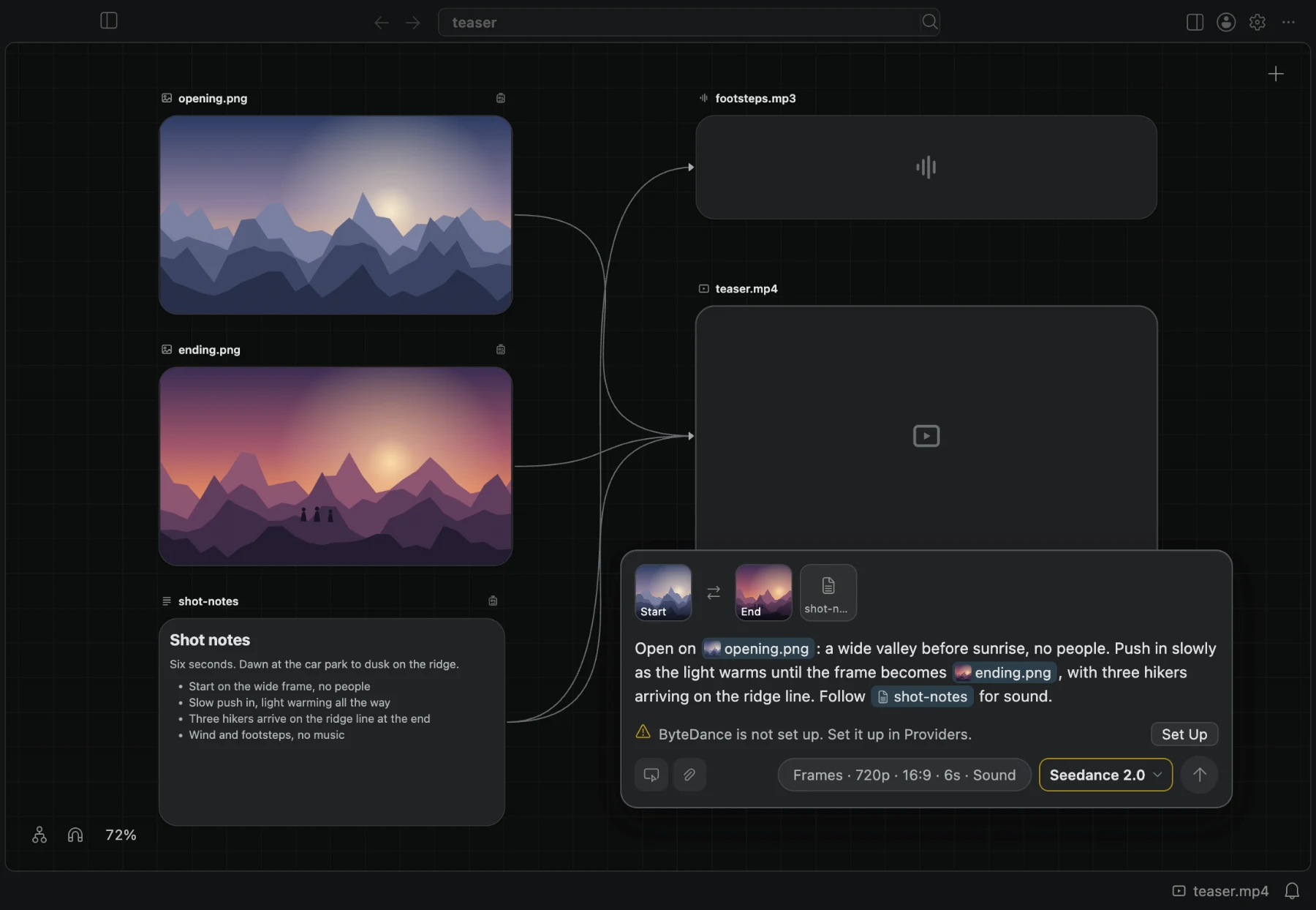
Drafts, inputs, and order
Double-click empty canvas and choose New Image, New Video, or New Audio. Or drag a connection from an existing card onto empty space and pick the kind of draft. That card becomes the first input.
A draft’s upstream connections are what the model receives. Images and clips become start frames, end frames, references, or material to extend. Notes join the prompt under their own names. For speech, a connected note is what the voice says. The input row above the prompt shows the same order as tiles; drag a tile to change it.
Type @ in the prompt to mention a file. Choosing a card that is not connected yet connects it. Mentions stay attached to that file when you reorder or rename.
We built it this way so the storyboard is the request. You are not pasting screenshots into a form and hoping the filenames match later.
Your keys, your providers
BaseHalf sends each request straight to the provider with your own key. There is no BaseHalf service in the middle, and we show no prices: cost lives in the provider console where you created the key. Credentials sit encrypted on the Mac, never in the project folder.
Set providers up in Settings, under BaseHalf. Video, image, and sound each offer the models those providers expose. Each model shows only the settings it accepts: mode, ratio, duration, voice, and the rest. When the connected inputs cannot fit the current mode, the panel switches to a mode that can, and that is what gets sent.
Generate with the button or Cmd+Enter. Progress stays on the card if you close the panel or switch canvases. Failures leave the card as a draft again, with the provider’s message, so you change what you need and retry on the same card. Earlier results are never overwritten; New Version copies the prompt, inputs, and settings onto a fresh draft beside it.
The result stays on the map
When the file arrives, the card shows it. Its panel still lists the inputs, prompt, model, and settings that made it. Connect from that result into the next draft if you want to continue the sequence. Agents can make the same kind of draft through .bh/ and basehalf --generate, because the request is just files in the folder.
The point is small and practical. Frames, notes, and clips you already arranged become the inputs. Your own keys talk to the providers. What comes back is another file on the canvas, ready for the next connection. That is generating from the canvas, not from a tab you will close.