
Tidy Canvas lays out cards along their connections
Tidy Canvas lays out every card on the current BaseHalf canvas along its connections. It does not follow the selection. After the cards move, you can keep the arrangement or revert it.
Cards pile up as you add notes, drop files, and draw connections. The current folder is still all there, but the layout no longer shows how things relate.
Tidy Canvas is how you ask BaseHalf to lay the current canvas out along those connections. It is the first of the view controls at the lower left of the canvas. Shift+Alt+F does the same; on a Mac the shortcut appears as ⇧⌥F.
What Tidy moves
Tidy lays out every card of the current canvas. It does not look at the selection. A card you have selected and a card you have not both move if they sit on this canvas.
It follows the connections already drawn here, and places every card along those lines.
Tidy runs on the canvas view. It does not run while a file fills Card Detail. The control is also disabled when the canvas has fewer than two cards: there is nothing to arrange.
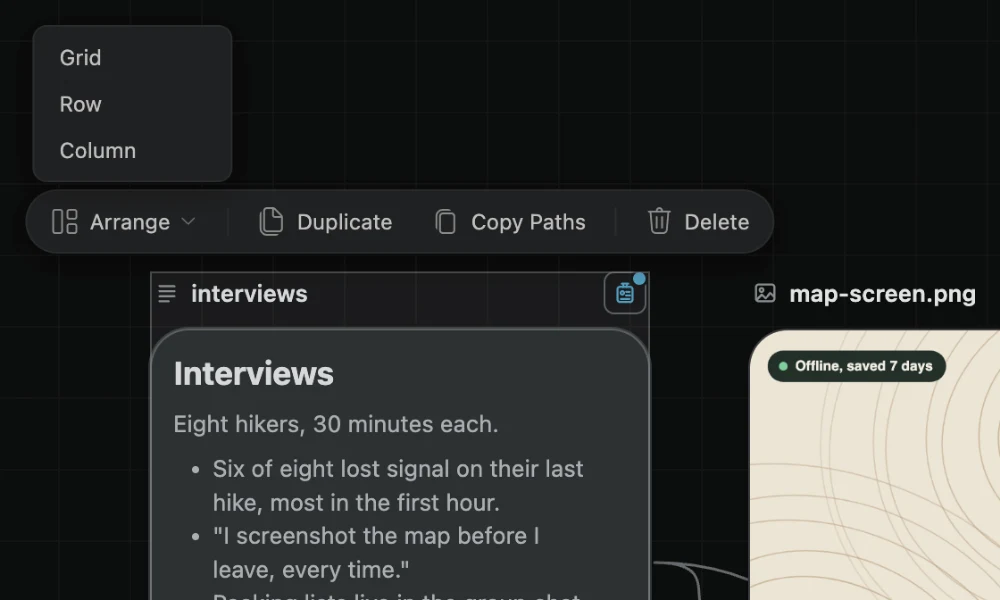
Selecting two or more cards makes a set. That set has its own toolbar, with Arrange (Grid, Row, or Column), Duplicate, Copy Paths, and Delete. Arrange lines up only the cards you picked. Tidy is the lower-left control, and it always considers the whole current canvas.
After the cards move
Once the cards have moved, BaseHalf asks Keep this arrangement?, with Revert and Keep. Revert puts every moved card back. Keep leaves them where Tidy placed them.
Leaving the canvas keeps the result. The question closes, and the new places stay.
Tidying is one undo step. Moving a set is one undo step, and arranging a set is one undo step. BaseHalf moves cards only when you ask.
Card places live under .bh/ and stay out of git, so a tidy on your machine does not become a layout diff for everyone else.
When Tidy helps
Use Tidy when the current folder has grown messy and the connections already say how the cards relate. The new layout follows those lines.
Use Arrange on a set when you only want a few cards in a grid, a row, or a column. That change stays with the cards you selected.
The canvas and cards docs describe both controls in one place. Tidy is for the whole current canvas, along its connections. Arrange is for the set you selected.